Disable UFW Globally
Customers who use Muppy within a VPC or a private network can completely and globally disable Muppy's management of the Hosts' Firewall.
By default, Muppy enables and configures the firewall on all Hosts at Enrollment time. Muppy then keeps the configuration of the Firewalls enabled at Enrollment up to date.
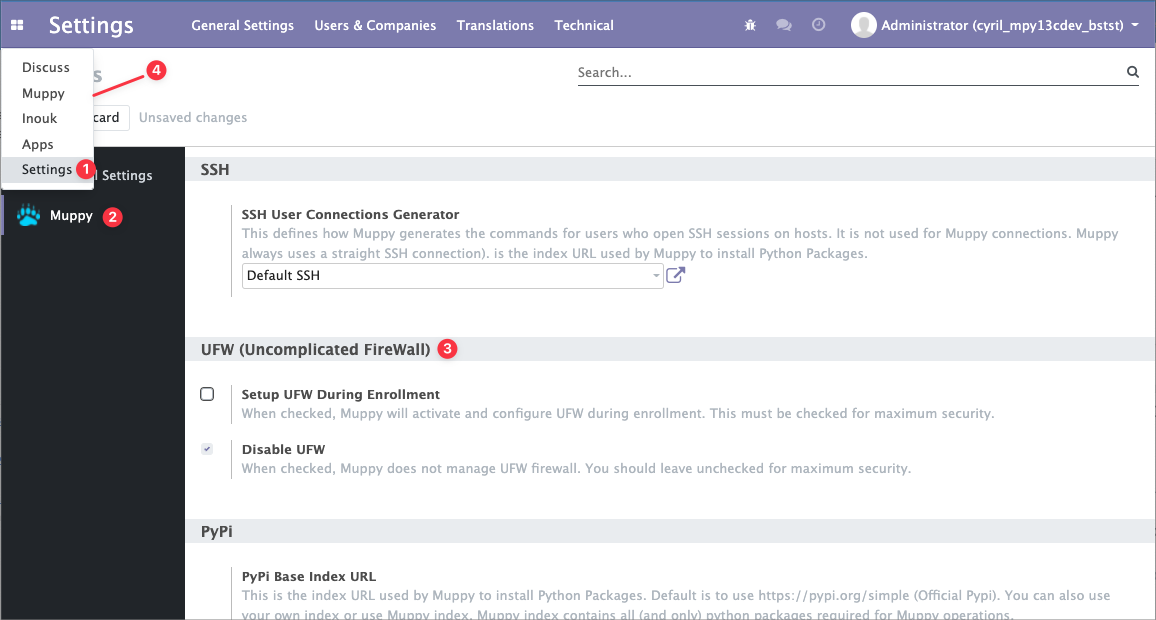
The following procedure lets you globally disable Firewall activation on Hosts:
- Open the Settings page.
- Select the Muppy settings.
- In the UFW (Uncomplicated FireWall) section:
- Uncheck Setup UFW During Enrollment.
- Check Disable UFW.
- Click the
 button.
Info
This configuration only affects Hosts that will be enrolled and future Firewall configuration updates.
For Hosts that are already configured, you must disable the Firewall on each of them.