SSH Keys
This section describes how to manage the SSH keys Muppy uses to connect to the Hosts it manages.
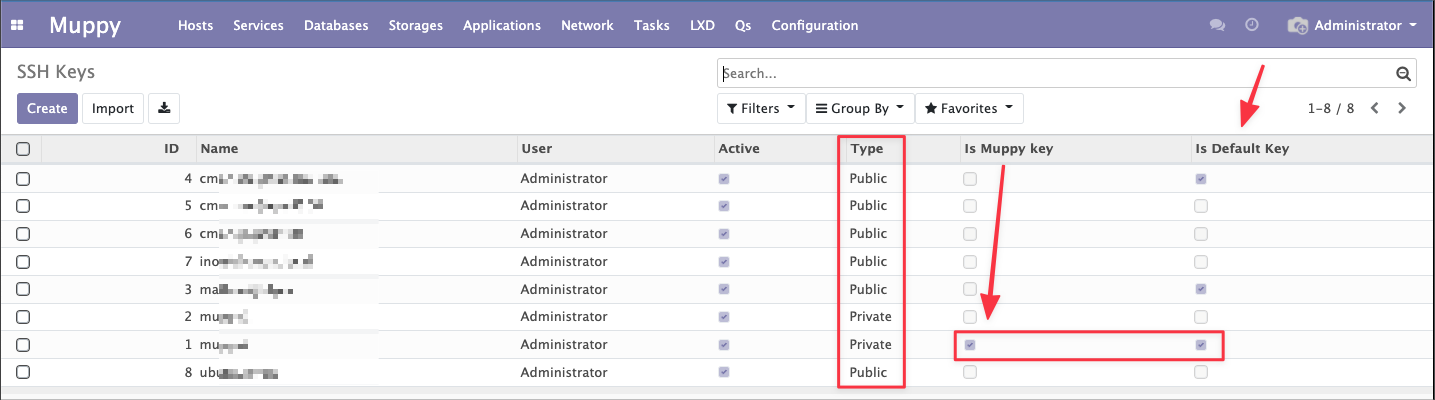
Just like an administrator would, Muppy connects over SSH to the Hosts it manages (only Public Key authentication is supported). To do so, Muppy uses a specific SSH Key: the Muppy Key.
Warning
When you provision or configure a Host meant to be managed by Muppy, you must add the Muppy Key to the list of authorized_keys of the user used to administer the Host.
Muppy lets you define a list of Default Keys. These are public keys that are automatically injected into Hosts at enrollment time.
In addition, some Muppy Apps need to manage private keys. This is the case, for example, of the "Muppy - Development Servers" App.
Muppy implements the following SSH key related features:
- SSH Key management
- Creating and editing public and private SSH keys
- Defining the Muppy Key: the private key used by Muppy to connect to Hosts.
- Defining the Default Keys: the public keys injected by default into Hosts
At the Host level, Muppy lets you:
- Manage the authorized_keys of the Host's users
- Extract the private SSH key of a Linux User
Opening an SSH Session
Wherever possible, Muppy lets you quickly open an SSH Session on a Host using the following two types of buttons:
 opens a session directly if your system is able to understand URLs using the
 ssh://protocol (this is the case on macOS, Linux Desktop, and Windows under Firefox).- If the first button does not work, you can use the "Copy Text" button on the lines of the zones:
 and paste it into your terminal.