Specific Network Configurations
Muppy can manage Hosts in a range of network topologies — public cloud servers, private hosts reached over Tailscale, and VMs / LXC containers reachable only through a gateway. This page explains the fields that describe a Host's networking and how Muppy uses them.
Public vs private Hosts
A Host carries an In the Cloud flag that states whether the server is reachable from outside its network:
In the cloud — Check this if server is publicly reachable. Uncheck this if server is on a private network.
- Public host (
In the cloudon) — Muppy connects directly to the host's IP. - Private host (
In the cloudoff) — the host lives on a private network and Muppy reaches it over Tailscale. During enrollment you install Tailscale on the host and use its Tailscale IPv4 address as the Control IP (see the Tailscale helpers in Host Creation and Enrollment).
Info
Toggling In the cloud also flips the Host's "Don't activate FW at Enroll" flag: private hosts skip automatic firewall activation during enrollment by default.
The three IP addresses
A Host distinguishes three IP roles. They are often the same address, but they differ for VMs, containers, and proxied hosts.
| Field | Role (quoted from the model) |
|---|---|
| Host IP | "IP address of the Host. When host is a VM (or LXC), this is the IP used to reach it from the Host VM/LXC Server. When Host is not 'In the cloud' this is the private IP. When Host is 'In the Cloud' this can be the private IP or the Public IP." |
| Control IP | "IP used by Muppy to control the host using SSH." |
| Public IP | "For servers behind Proxies or Tunnel, the IP their traffic originate from. By default this is the same as the Control IP." |
The form pairs Control IP with the Control Port (the SSH port Muppy uses), and Public IP has a Detect button that asks the host to report the IP its outbound traffic originates from.
Tip
For a plain public server the three addresses are identical. They diverge when the host is a VM/LXC (Host IP is private, Control IP is the gateway's) or when it sits behind a proxy/tunnel (Public IP differs from Control IP).
SSH gateway / ProxyJump
A Host can be reached through another Host acting as an SSH jump host:
- SSH Gateway Host (
ssh_gateway_host_id) — "When defined, Host will be used as SSH jump host (ProxyJump). Used by VMs and LXC containers whenlxc_use_ssh_jump_hostis enabled on the allocator."
When a gateway is set, Muppy connects to the target Host through the gateway with SSH ProxyJump, and the direct "SSH as ControlUser" shortcuts are hidden on the form.
VMs and LXC containers
Hosts that are virtual machines or LXC containers are flagged with Is VM/LXC (is_vm):
- Is VM/LXC — "If checked, host is a kind of virtual machine, LXC Container managed by Muppy."
- VM/LXC Host Server (
vm_server_host_id) — "Host into which VM/LXC is hosted."
When a VM/LXC Host Server is selected, Muppy derives the Control IP from that server's Host IP — Muppy reaches the VM/container through the physical Host that runs it. VMs/LXC also default to skipping automatic firewall activation during enrollment.
These Hosts appear under the Muppy ▸ Hosts ▸ LXC Containers menu.
The Host Network tab
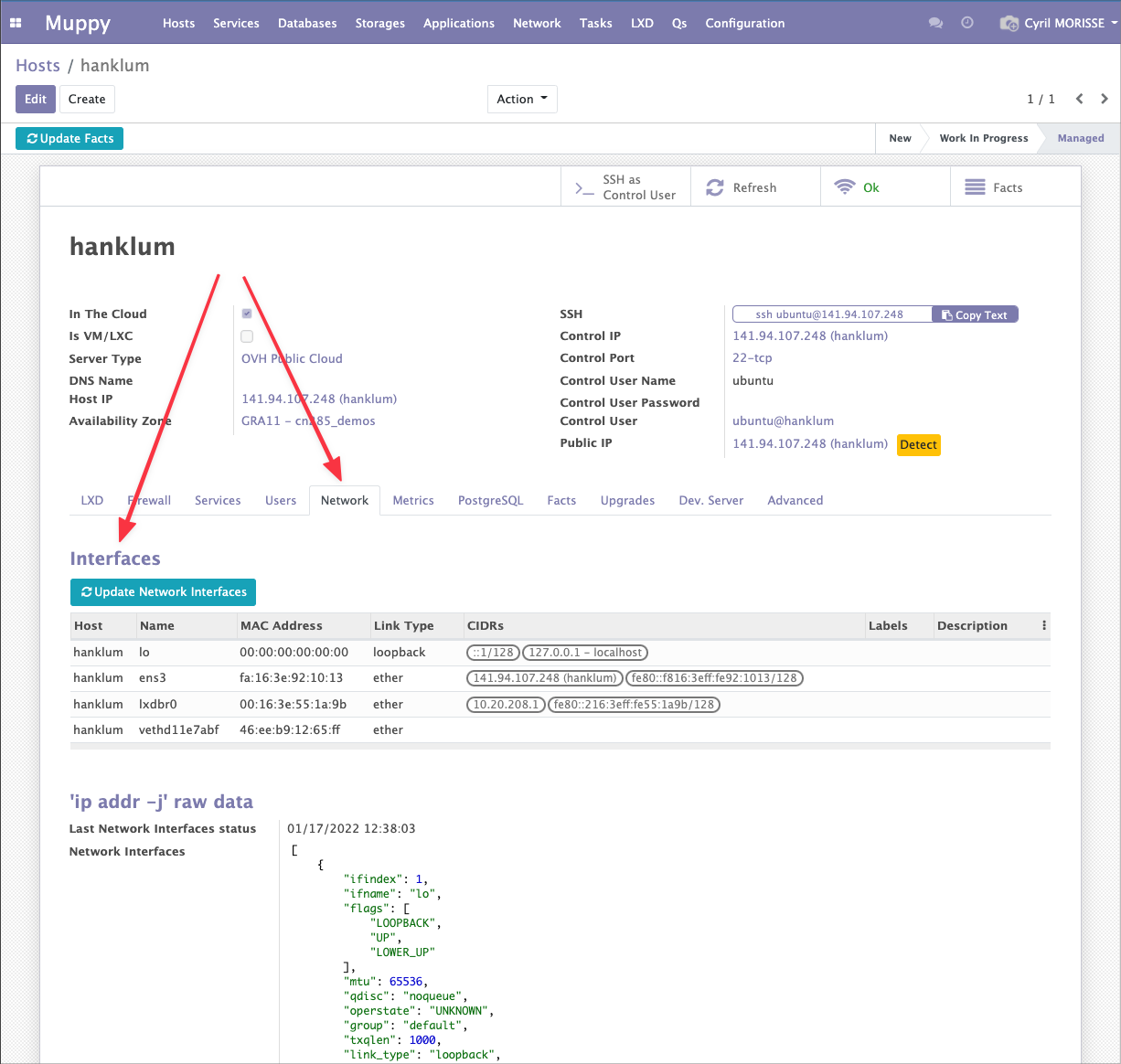
Once a Host is enrolled, its Network tab gathers the collected networking facts:
- Interfaces — the host's network interfaces, refreshable with Update Network Interfaces.
- Exposed Network Ports — the ports the host exposes.
- the raw
ip --json addroutput, for reference.
For details on configuring the firewall around these interfaces and ports, see Firewall UFW.