Host Users
The Users tab of the Hosts form gives access to the list of the Host's Linux users (mpy.host_user). It also exposes a set of copy-paste Helpers to bootstrap or adjust accounts on the server.
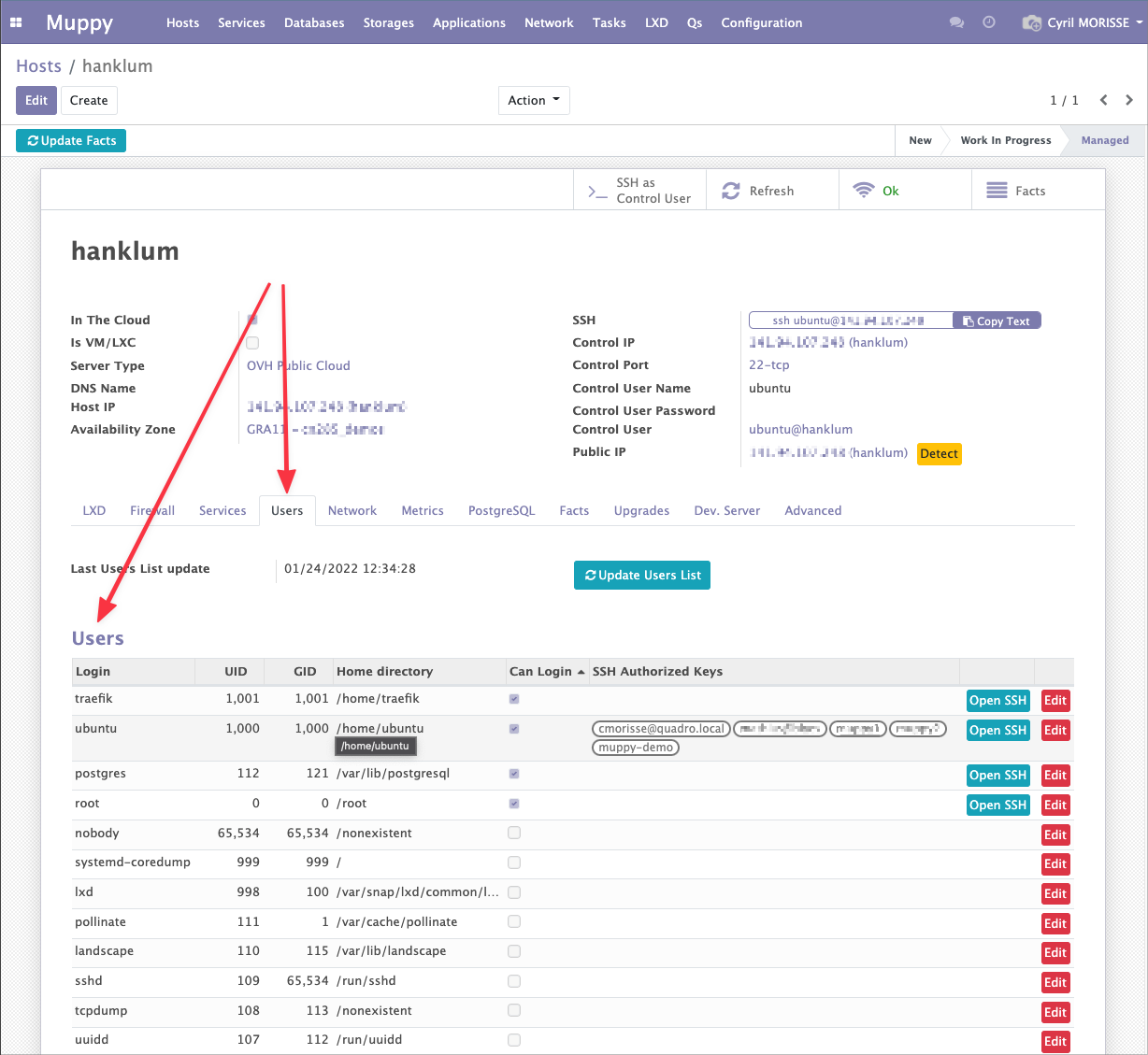
Users List
The list is built by Fact collection: Muppy reads the accounts on the server (essentially /etc/passwd) and materialises one record per user.
The Last Users List update field (fact__host_users_list_ts) shows when the list was last collected, and the Update Users List button re-runs the collection on demand.
Each row displays the user's main attributes:
| Column | Description |
|---|---|
Login (name) |
The Linux login name. |
| UID | System user ID. |
| GID | System group ID. |
| Home directory | Absolute path of the user's home folder on the server. |
| Can login | Whether the user can open a shell (derived from a shell ending in sh). |
| SSH Authorized Keys | The keys present in ~/.ssh/authorized_keys, shown as tags. |
Two per-user actions are available at the end of each row:
- Open SSH — opens an SSH session to the Host as that user (shown only when the user can login and the Host has no SSH gateway).
- Edit — opens the User's form view, where you manage the SSH keys authorized to connect.
Info
The Users list lets you manage the SSH keys authorized to connect. The full workflow (Sync / Pull / Push / Add default keys) is described on the Managing authorized_keys page.
Helpers
The Helpers group provides ready-to-run commands. Enter a Username in the transient input at the top of the group and the commands below are recomputed for that user.
Info
The Username field is transient: it is not saved on the Host. It only drives the generated commands. Until you fill it, each command field displays Enter a 'Username' above.
Setup passwordless sudoer
Enables passwordless sudo for the user by adding a dedicated sudoers.d drop-in:
echo "<username> ALL=(ALL) NOPASSWD:ALL" | sudo tee -a /etc/sudoers.d/<username>
Remove passwordless sudoer
Removes the drop-in created above, revoking the passwordless sudo privilege:
sudo rm -rf /etc/sudoers.d/<username>
Create Muppy control user (mpyadm)
This is the bootstrap command for hand-provisioned hosts that Muppy does not yet manage. It creates the Muppy control user, grants it passwordless sudo, sets up ~/.ssh, and installs Muppy's public key into the user's authorized_keys:
sudo adduser --quiet --shell /bin/bash --gecos=",,," --disabled-password <username> \
 && echo "<username> ALL=(ALL) NOPASSWD: ALL" | sudo tee "/etc/sudoers.d/<username>" > /dev/null \
 && sudo chmod 0440 /etc/sudoers.d/<username> \
 && sudo mkdir -p /home/<username>/.ssh && sudo chown <username>:<username> /home/<username>/.ssh \
 && echo "<muppy_public_key>" | sudo tee -a /home/<username>/.ssh/authorized_keys \
 && sudo chown <username>:<username> /home/<username>/.ssh/authorized_keys \
 && sudo chmod 700 /home/<username>/.ssh/authorized_keys
The generated command embeds Muppy's actual public key, so it is ready to paste on the target server. A second, more readable rendering of the same command is shown right below the copy field.
Tip
If the target system requires a password for sudo, first run sudo ls / to enter sudo mode, then paste the command above.