Import existing OVH instances
When OVH Public Cloud instances already exist (created outside Muppy, or to re-register a VM Muppy lost track of), the Enroll OVH Public Cloud Instances wizard registers them as Muppy Hosts in one pass — fetch the project's instances, then import them, optionally enrolling immediately.
Import vs. Commission
Use this wizard to register existing instances. To create new instances, use Commission an Instance instead.
Open the wizard
Muppy ▸ Hosts ▸ Provisionning ▸ Enroll OVH Public Cloud Instances.
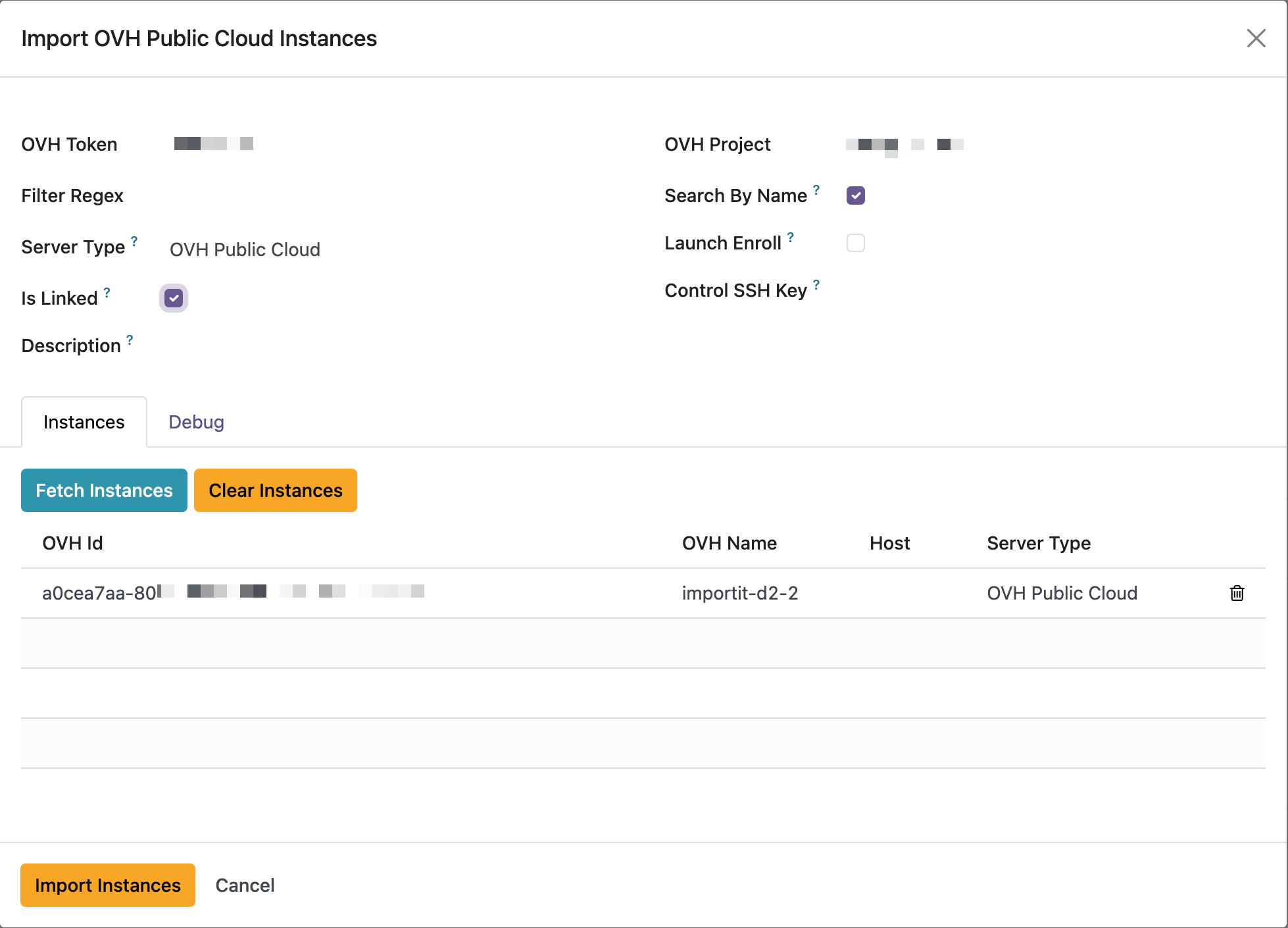
1. Choose the account, project and defaults
| Field | Meaning |
|---|---|
| OVH Token (required) | The OVH account to import from. |
| OVH Project (required) | The OVH project whose instances to list. |
| Server Type (required) | The Server Type assigned to the imported Hosts (it parameterizes enrollment — e.g. OVH Public Cloud). Can also be set per row. |
| Is Linked | When on, each imported Host is marked linked — Muppy owns the cloud instance, so a later decommission will delete the OVH VM. Leave off to merely track a VM you don't want Muppy to destroy. |
| Launch Enroll | When on, each imported Host is enrolled immediately after import (→ ==Managed==). Off: import only; enroll later. |
| Filter Regex | Optional. Only fetch instances whose name matches this regular expression. |
| Search By Name | On by default: bind fetched instances to existing Hosts by hostname + IP. Off: match by OVH id + project only. Prevents duplicates when re-importing. |
| Control SSH Key | Optional. A host-specific SSH key used to control the Hosts instead of the default Muppy Key. |
| Description | Optional text injected into each imported Host's description. |
Is Linked governs deletion
Is Linked decides whether a future decommission destroys the OVH VM. Turn it on only for instances whose full lifecycle Muppy should own.
2. Fetch the instances
On the Instances tab, click Fetch Instances. Muppy calls the OVH API and lists the project's instances — OVH Id, OVH Name, the mapped Host (filled when the instance is already a Muppy Host), and a per-row Server Type. Clear Instances empties the list.
Token must be connected
If the account token is disconnected/invalid, Fetch fails with "Failed to call OVH API. Check Token." — reconnect the account first (see Commission an Instance ▸ Connect an OVH account).
3. Import
Click Import Instances. Each listed instance becomes — or binds to — a Muppy Host; instances already mapped to a Host (per Search By Name) are matched, not duplicated. Muppy then opens the Imported OVH Hosts list.
- If Launch Enroll was on, enrollment runs in the background and each Host reaches ==Managed== — follow it under Muppy ▸ Tasks / Qs or via the Host's state.
- Otherwise the Hosts are registered as ==New==; enroll them later with Enroll Server on the Host form (see Host Creation and Enrollment).